IDEs
Wails aims to provide a great development experience. To that aim, we now support generating IDE specific configuration to provide smoother project setup.
Currently, we support Visual Studio Code and Goland.
Visual Studio Code
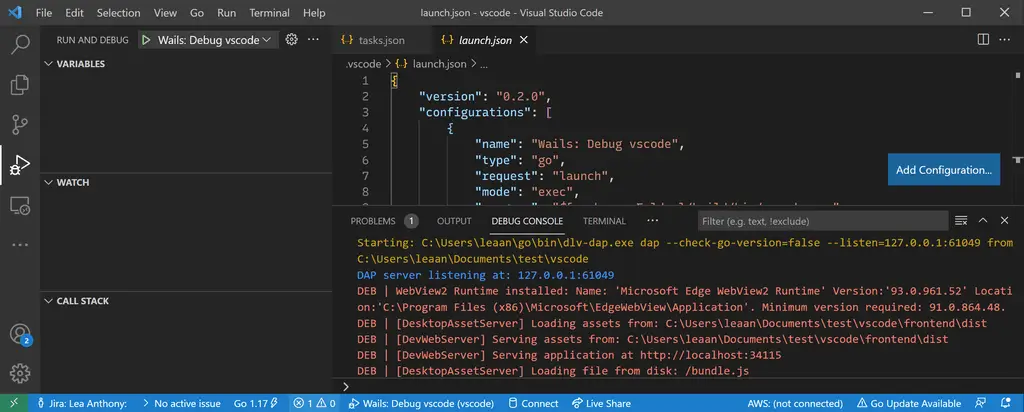
When generating a project using the -ide vscode flags, IDE files will be created alongside the other project files. Эти файлы помещаются в директорию .vscode и предоставляют правильную конфигурацию для отладки вашего приложения.
The 2 files generated are tasks.json and launch.json. Below are the files generated for the default vanilla project:
{
  "version": "2.0.0",
  "tasks": [
    {
      "label": "build",
      "type": "shell",
      "options": {
        "cwd": "${workspaceFolder}"
      },
      "command": "go",
      "args": [
        "build",
        "-tags",
        "dev",
        "-gcflags",
        "all=-N -l",
        "-o",
        "build/bin/myproject.exe"
      ]
    }
  ]
}
{
  "version": "0.2.0",
  "configurations": [
    {
      "name": "Wails: Debug myproject",
      "type": "go",
      "request": "launch",
      "mode": "exec",
      "program": "${workspaceFolder}/build/bin/myproject.exe",
      "preLaunchTask": "build",
      "cwd": "${workspaceFolder}",
      "env": {}
    }
  ]
}
Configuring the install and build steps
The tasks.json file is simple for the default project as there is no npm install or npm run build step needed. For projects that have a frontend build step, such as the svelte template, we would need to edit tasks.json to add the install and build steps:
{
  "version": "2.0.0",
  "tasks": [
    {
      "label": "npm install",
      "type": "npm",
      "script": "install",
      "options": {
        "cwd": "${workspaceFolder}/frontend"
      },
      "presentation": {
        "clear": true,
        "panel": "shared",
        "showReuseMessage": false
      },
      "problemMatcher": []
    },
    {
      "label": "npm run build",
      "type": "npm",
      "script": "build",
      "options": {
        "cwd": "${workspaceFolder}/frontend"
      },
      "presentation": {
        "clear": true,
        "panel": "shared",
        "showReuseMessage": false
      },
      "problemMatcher": []
    },
    {
      "label": "build",
      "type": "shell",
      "options": {
        "cwd": "${workspaceFolder}"
      },
      "command": "go",
      "args": [
        "build",
        "-tags",
        "dev",
        "-gcflags",
        "all=-N -l",
        "-o",
        "build/bin/vscode.exe"
      ],
      "dependsOn": ["npm install", "npm run build"]
    }
  ]
}
In the future, we hope to generate a tasks.json that includes the install and build steps automatically.